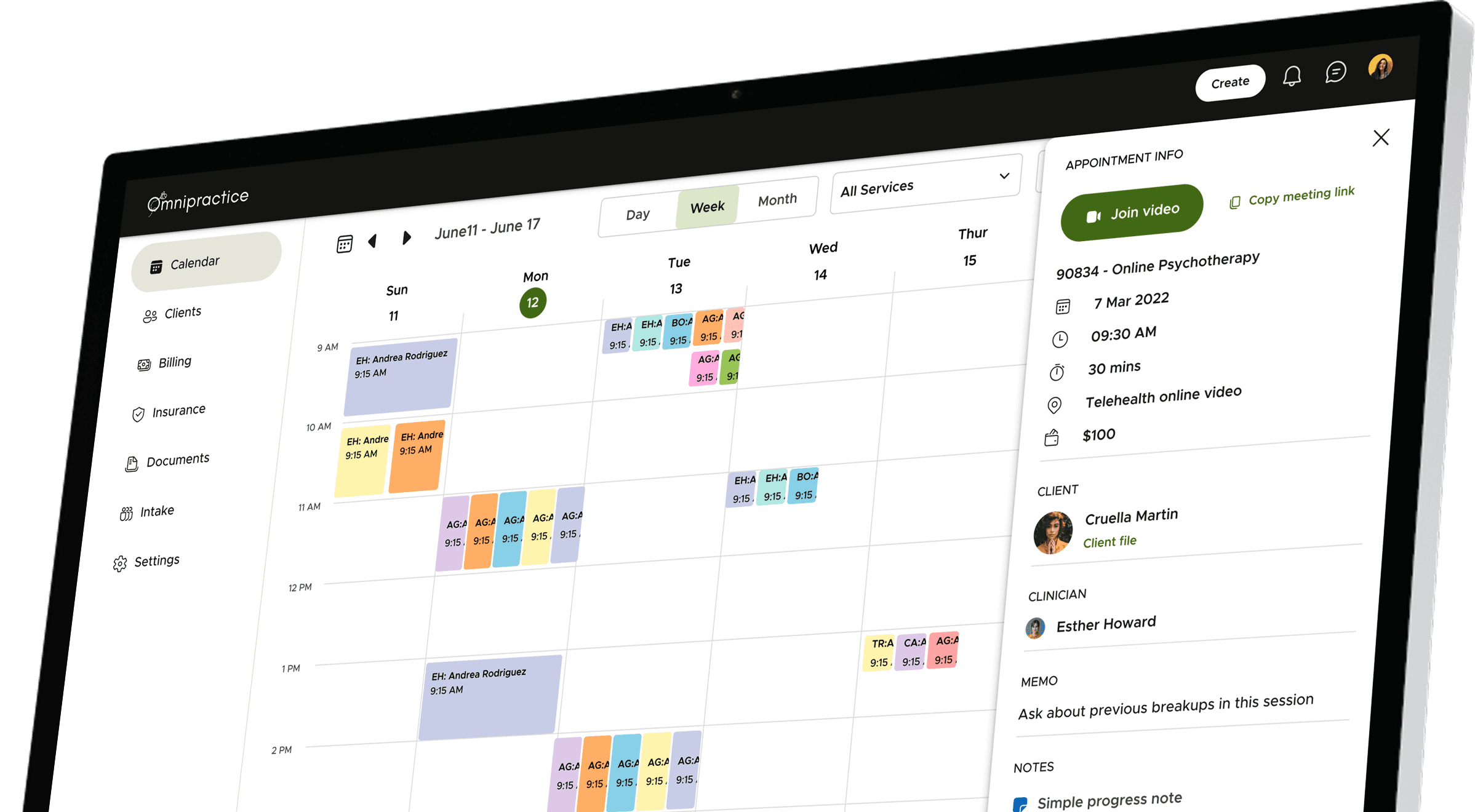
Omnipractice is a tool that helps therapists and mental health clinics run their practice more smoothly. Instead of using many different apps for appointments, notes, billing, and insurance, they can do it all in one place.
Company
Sprung Inc
Role
Lead Product Designer
Length
12 months
Team
2 Designers, 5 Developers, 1 QA, 1 Manager
Year
2023-2024
Contents
Part I
1.
Why
Why did we build
1.1
Problem statement
1.2
High level goals
2.
What
What did we build
2.1
Core modules
2.2
Insights to decisions
2.3
Iterations
3.
How
How did we build
3.1
User research
3.2
Identity
3.3
Design system
3.4
Impact
Preface: My role & challenges
I led the end-to-end product design for Omnipractice, from early discovery to final handoff. As the primary designer, I owned everything from research to systems thinking, while collaborating closely with a junior designer who supported execution across screens and components.
This wasn’t just a UI job—I was deeply embedded in product strategy, helping define the roadmap alongside stakeholders and translating domain complexity into a clear, usable platform. I designed the system from scratch, set up scalable foundations, and drove design decisions grounded in real user insights.
Working remotely across time zones and designing for the nuanced workflows of US-based mental health practices required both domain ramp-up and tight collaboration. It was hands-on, high-ownership work—and one of the most rewarding builds I’ve been part of.
1.
Why
Why did we build
Behind every practice is a provider balancing client care with heavy administrative work. We saw the toll outdated systems were taking — on their time, on their energy, and sometimes even on client outcomes.
We saw an opportunity to lift that weight, giving providers the freedom to focus where it matters most: their clients.
Problem statement & Goals
How might we create a seamless, all-in-one practice management solution that eliminates fragmented workflows, minimise admin work, and adapts to the diverse needs of mental health professionals?
Reduce Administrative Burden
Minimize time spent on scheduling, billing, and insurance tasks through automation.
Enhance flexibility
Offer customizable features to accommodate different practice needs, from solo therapists to large clinics.
Ensure Seamless Client Management
Enable therapists to manage multiple client relationships (individuals, couples, and families) without duplication.
Fast User Adoption
Create an intuitive, all-in-one platform that seamlessly integrates into existing workflows.
2.
What
What did we build
Core modules
🗓️
Calendar
This is where therapists manage their day. They can see upcoming appointments, check their availability, and even join video calls—all from one screen. It also syncs with Google Calendar, so everything stays up to date automatically.
🧑🏻🤝🧑🏽
Clients
A place to keep track of everyone they work with—individuals, couples, or families. Therapists can view client details, notes, session history, and even manage relationships like a parent for a minor. Everything is neatly organised.
💵
Billing
Therapists can easily see who paid, who hasn’t, and what’s due. Invoices are created automatically, and payments can be charged with just one click. No more chasing down payments or doing math at the end of the day.
🪪
Insurance
Submitting claims doesn’t have to be a headache. Omnipractice fills out the CMS 1500 forms for them, pulls in all the right info, and even tracks the status of claims in real time. That means fewer errors and faster payments.
🗂️
Documents
Notes, forms, assessments—all in one place. Therapists can use ready-made templates or build their own, just like Google Forms. Supervisors can review and sign off when needed, and everything is securely stored.
Insights to Design decisions
Talking to therapists, practice owners, and billers gave me a front-row seat to the everyday chaos behind the scenes. I started to see clear patterns in their day-to-day challenges. These insights played a big role in shaping how we approached the product.
This section is a peek into how those honest conversations shaped the product. I’ll walk you through a few of those key learnings and how they translated into design decisions that made Omnipractice simpler and more useful.
1
Managing multiple client relationships
“I see individuals, couples, and families, but my software forces me to create separate accounts for the same person”
– James Holloway, LCSW
In mental health practices, a single person might see one therapist individually, attend couples therapy with a partner, and also be part of a family session — sometimes with different providers. Most tools struggle to support this, making it hard to manage records, ensure privacy, and offer a unified login experience without messy workarounds.
The fix - flexible client profiles
We figured out a way to handle this more elegantly:
by allowing multiple profiles under a single login. Each profile—whether it’s for individual, couples, or family therapy—gets its own client file. That means different therapists can work with the same person in different contexts, while keeping records private and organized. Clients only need one secure login, and everything stays tidy behind the scenes.
85%
Clients said the feature solved the problem for them.
2
Complex Billing & Insurance
“Billing and insurance take up more time than actual therapy.”
– Dr Maya Ellis, LMFT, Practice Admin
Therapists were juggling between generating invoices, charging cards, filling CMS 1500 forms, and chasing insurance updates — often across different tools or spreadsheets. And because of all the manual work, errors happened, payments got delayed, and it all added up to burnout.
“I’m a therapist, not an accountant.”
“Our billing software looks like it’s from 2005.”
“Insurance is just… a nightmare.”
The fix - automated and assisted billing
So we figured out a better way:
Invoices are auto-generated after each session.
Payments are collected seamlessly — manually or auto-charged via Stripe.
Insurance claims are auto-filled with the right client, provider, and service details.
You can even track claim statuses in real time — no more digging through insurance portals.
It’s built for real people, not billing pros. Because therapy is hard enough without billing getting in the way.
35%
less claim rejections
70%
clients find it better than their previous solution
3
Fragmented workflows
“By the time I finish hopping between tools, I’ve already lost track of what I was doing.”
— Lisa Bennett, LMFT
Therapists told us they were bouncing between apps all day—one for scheduling, another for billing, something else for notes, and yet another for insurance. It was exhausting.
This constant hopping between platforms not only eats up valuable time, but also makes it easy to lose context, miss details, or make mistakes. It’s a mental load therapists shouldn’t have to carry.
“I just want one place where I can see what’s going on with my clients.”
The fix -all in one platform
We brought all the essential tools—scheduling, billing, notes, and insurance—into a single, connected space. No more bouncing between tabs or losing context. Just one smooth, focused workflow that lets therapists stay in the zone.
4
Rigid workflows
“I do a bit of everything—therapy, supervision, and admin. But the software doesn’t get that. It boxes me into just one role.”
— Sarah Paul, Practice admin
Every practice runs a little differently. Some therapists run solo practices, some work in small to mid-sized groups, and others are part of larger clinics or hospitals.
And within these setups, people wear different hats.
The fix - custom roles and workflows
To support all kinds of practice setups, we built a flexible system that adapts to how people actually work.
Instead of forcing a rigid role structure, we let practices assign custom roles and permissions—so someone can be just a biller, a scheduler, or wear multiple hats like therapist + admin + supervisor.
This way, whether you’re a solo provider or part of a larger team, you only see what you need, and you’re never blocked from what you actually do.
You can also create your own session types, templates, and workflows—so the system bends to fit your practice, not the other way around.
One of our favourite moments was seeing a clinic use Omnipractice to assign custom roles for every team member—from interns to billing staff—and say,
Design system
To make the product feel cohesive from the start, we built a design system early in the process. It helped us stay consistent, move faster, and maintain clarity across teams as the product grew.
What we built
Our system included all the foundational components: buttons, inputs, modals, and layout grids — in multiple sizes and states. It also covered tokens for spacing, typography, and color, making handoff to development easier and more reliable.
How it helped
Allowed us to move faster during later stages of design.
Reduced back-and-forth with developers on spacing and style decisions.
Gave us a shared language across design and engineering.
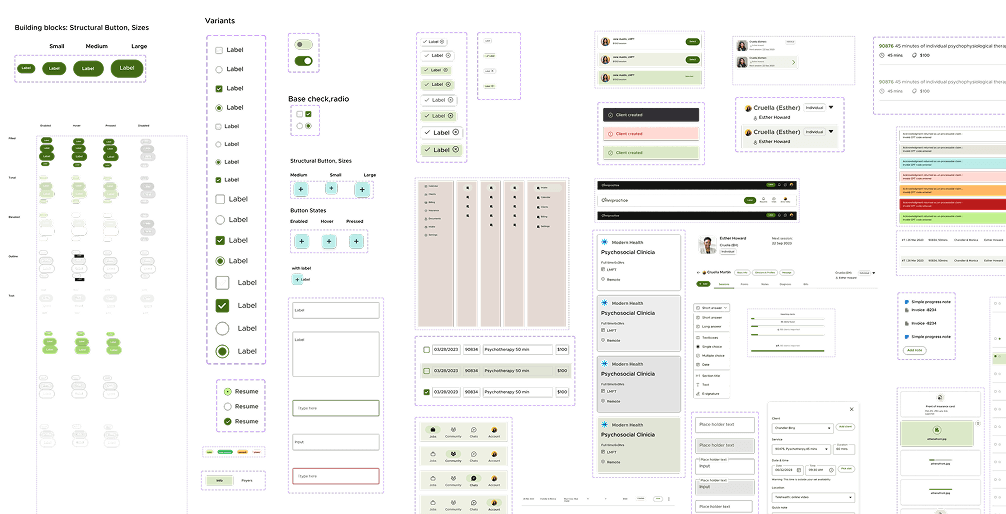
Design System snapshot - Overview
Components & Assets
Button component
Iterations
We didn’t nail everything on the first go — and honestly, that’s where the magic happened. We tested, tweaked, and sometimes totally reworked things based on real feedback. Here’s a peek at some of those moments.
1
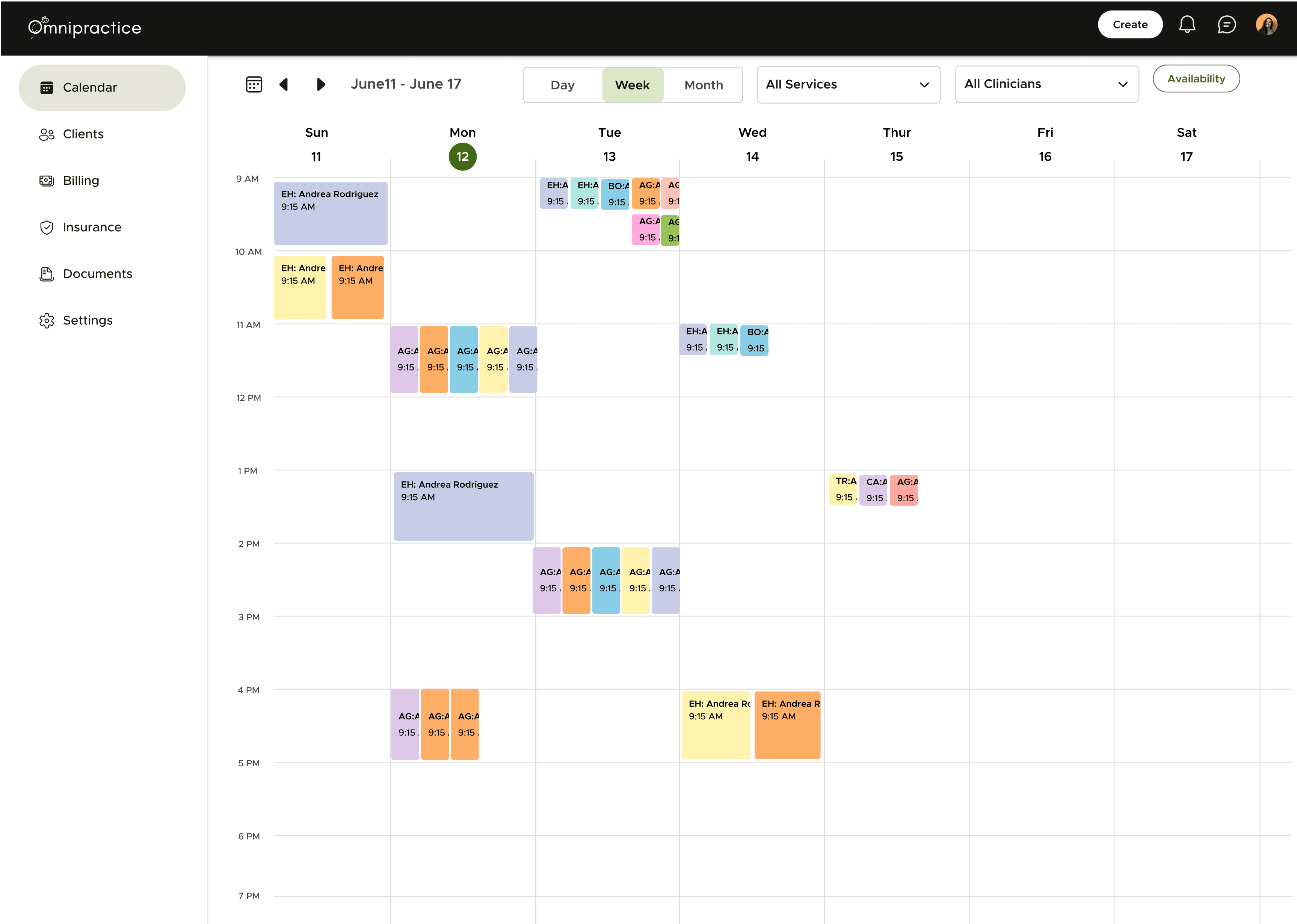
Calendar
Before
Hard to spot free solts
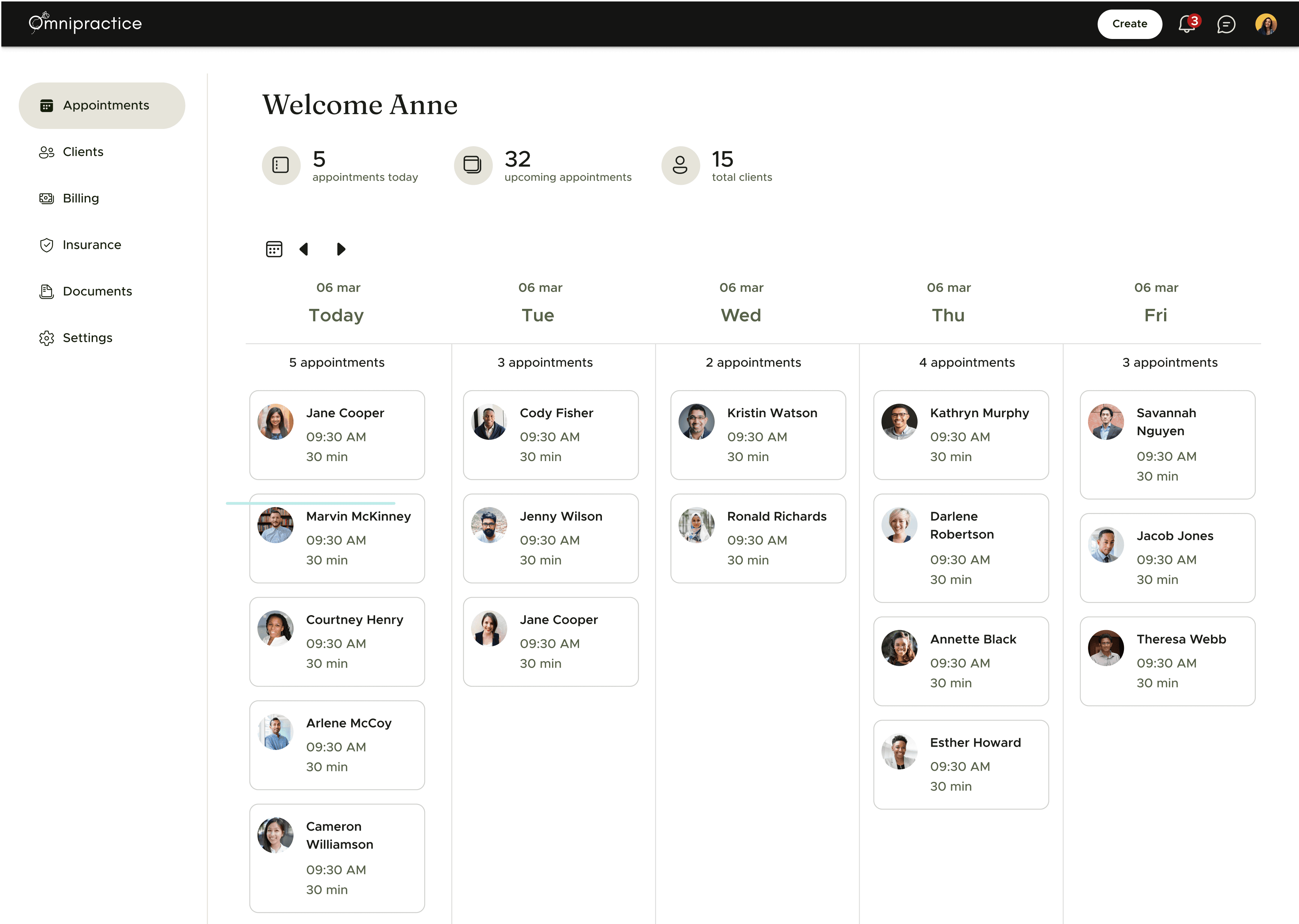
After
Easier to spot free slots and availability
80%
Preferred calendar over appointments (user surveys)
2
Form builder
Before
User feedback on lack of flexibility and ease of use
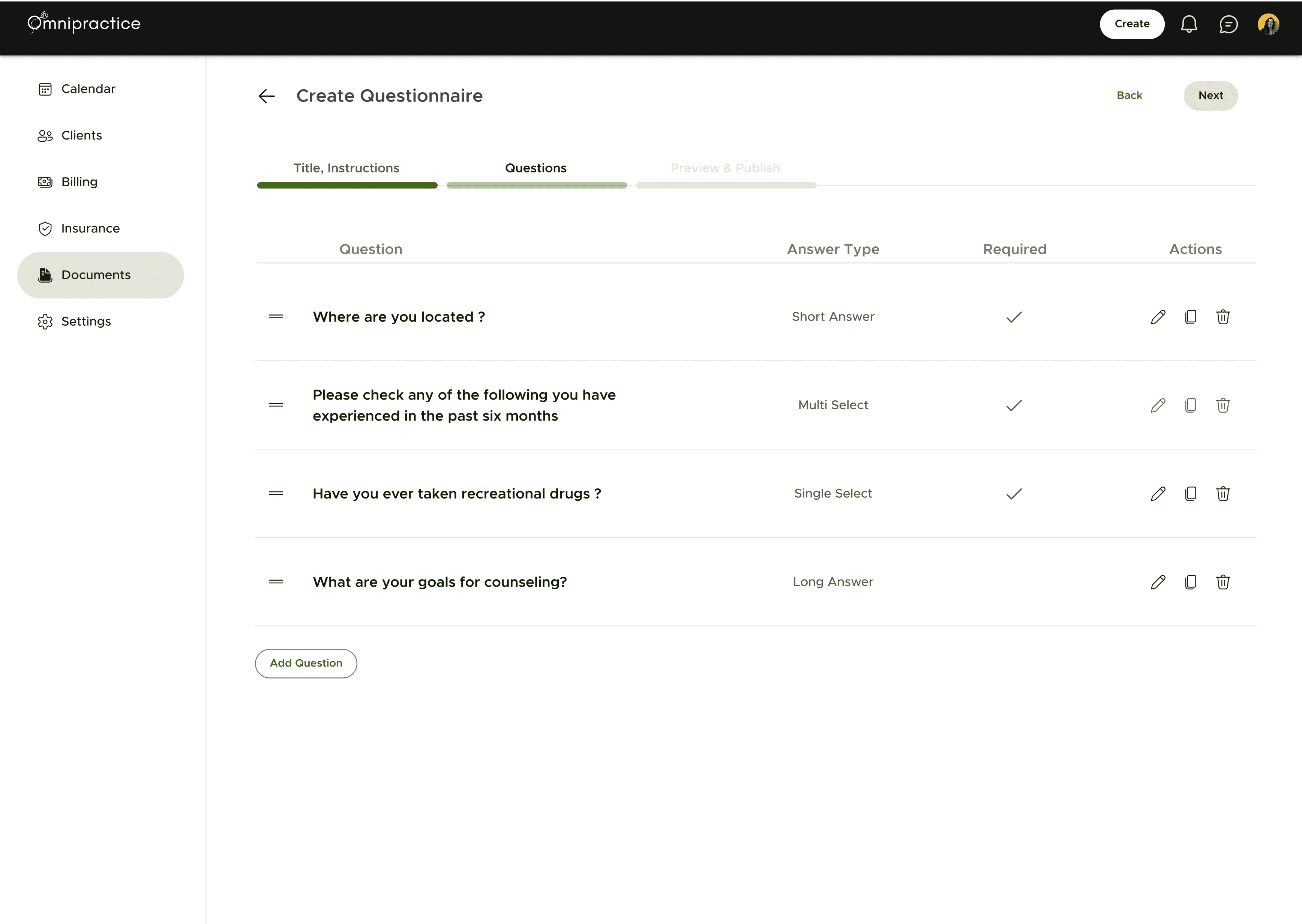
After
Google form style custom form builder
3.
How
How did we build
User feedback

The Process
🔍
35+ user interviews over Zoom with therapists, practice managers, and billing specialists to uncover their biggest pain points.
📼
100+ hours of recorded sessions and meetings analyzed to understand real-world workflows and challenges.
🗺
Mapped 15+ existing tools and processes, identifying inefficiencies, redundancies, and gaps in practice management.
Demography
🧑💼
Age & Experience
55%
28-40 years old, Early to mid-career professionals, balancing clinical work with growing their practice.
35%
40-50 years old, Established providers running solo or small group practices.
10%
50+ years old, Senior therapists transitioning from traditional systems to modern digital solutions.
📍
Location
80%
United States (California, New York, Texas)
15%
15%: Canada and Australia (English-speaking regions with similar practice models)
5%
Other international users
🏥
Practice size
45%
Solo Practitioners (60%): Independent therapists managing their own clients and operations.
35%
Small to Mid-Sized Group Practices (35%): Teams of 2-20 providers requiring collaboration and billing support.
20%
Large Clinics, Multi-location practices with complex administrative needs.
💻
Tech proficiency
60%
Moderate, Familiar with digital platforms but prefer simple, intuitive interfaces.
20%
High,Tech-savvy therapists, comfortable with digital tools, looking for efficiency.
20%
Low, Struggling with complex software, previously using paper-based or outdated systems.
Our research helped us identify a consistent user profile. Most users are individual therapists between their late 20s and early 40s, typically working independently or within small group practices. The majority are based in the United States, with notable representation in states like California, New York, and Texas.
While they are generally comfortable using technology, their primary focus is on client care — not navigating complex software. This highlighted the importance of building tools that are intuitive, reliable, and easy to integrate into their daily workflow.
Persona wall

Ground Reality & Insights
User research gave us what planning alone couldn’t: a clear view into the day-to-day realities of our users. What initially appeared simple often turned out to be more layered and context-dependent.
For example, we assumed that most therapists would operate within a single practice or platform. In reality, many providers divide their time across multiple settings — including private practices, hospitals, and telehealth platforms. As one therapist shared:
“I see clients in two practices and do supervision in a third. My calendar is a mix of everything.”
This made it clear that availability tracking and scheduling needed to support multiple contexts, not just a single system.
We also saw that responsibilities within a practice can vary significantly. While some therapists focus solely on client sessions, others take on administrative work, supervise peers, or assist with billing. Many practices also employ dedicated non-clinical staff for roles like client onboarding and invoice management. Rigid role definitions didn’t reflect how work actually happens.
“Sometimes I wear three hats — therapist, admin, and clinical supervisor. It really depends on the day.”
This led us to rethink how permissions, visibility, and user roles should function — shifting from fixed templates to more flexible configurations that can support blended responsibilities.
Billing workflows also surfaced as a key area of friction. Many therapists mentioned needing to double-check insurance codes, correct errors, and switch between different tools just to complete billing tasks.
“The systems don’t talk to each other. I have to cross-reference so much, it slows down everything.”
These insights helped us better understand how workflows differ based on context, team structure, and individual preferences. Instead of building for a theoretical “standard flow,” we learned the importance of designing for the practical variations that show up in real-world use.
Identity

To design something that feels authentic, we first had to define the personality behind it. By defining a clear set of traits, we could make design decisions that felt intentional and true to the product’s purpose.
🌱
Growth
We designed Omnipractice to not just support, but nurture mental health professionals and their clients, enabling them to thrive. From career growth for providers to personal progress for clients, every design decision fosters a path toward continuous development.
⚡
Modern
We wanted Omnipractice to feel fresh and contemporary, moving away from the outdated, clunky interfaces common in the industry. Every interaction was crafted to be seamless, efficient, and visually engaging.
Impact
It wasn’t just the numbers that stood out—it was what people said. For the first time, providers felt in control instead of overwhelmed.
“

Jessica Tran, LMFT, Practice Owner
Within a month of soft launch
10+
Business Clients
500+
Users
Designing Omnipractice taught me that the best solutions come from listening deeply and iterating often. This project wasn’t always easy, but every challenge helped shape a better product—and made me a stronger designer.
it was a lesson in empathy, collaboration, and strategic problem-solving. Leading the product from the ground up gave me the opportunity to balance user needs, business goals, and technical constraints at every step.
Fin